
TL;DR. herdr plays one sound when any agent finishes and another when any agent needs you. With seven spaces open, that tells me something happened but not where. herdfxr is a herdr plugin that picks the sound by space, and it includes a terminal sfxr so you can make the sounds without leaving herdr. MIT, on GitHub at joehahndev/herdfxr.
I keep seven herdr spaces open. Client work, the homelab, a couple of music projects. When a chime goes off, I alt-tab and hunt for the agent that made it.
The built-in sound settings get you most of the way. There's one done sound and one needs-input sound, an on/off switch per agent, and mp3 files only. Nothing per space. So the chime says somebody is waiting.
herdr's plugin API is the CLI
A herdr plugin is a folder with a herdr-plugin.toml and whatever programs you want herdr to run. There's no SDK. The docs say the whole CLI is the plugin API, and they mean it: your script gets HERDR_BIN_PATH and calls herdr like you would.
id = "joehahn.herdfxr"
name = "herdfxr"
version = "0.1.0"
min_herdr_version = "0.9.0"
platforms = ["linux", "macos", "windows"]

[[events]]
on = "pane.agent_status_changed"
command = ["node", "bin/hook.js"]
The event payload arrives in an env var. That keeps the hook boring, which is what you want from a thing that runs on every status change.
Probe first, then build
The docs name the event. They don't show the payload. So the first plugin I wrote was a probe: hook four events, dump every HERDR_* variable and both JSON blobs to a file.
To trigger events without waiting on a real agent, herdr lets you fake one in a background tab:
herdr tab create --label probe --no-focus
herdr pane report-agent <pane> --source probe --agent probe-agent --state blocked
Three things came out of that, and none of them are in the docs.
There is no done status. Agents report working, blocked, idle and unknown. "Finished" is a transition, working → idle, so the plugin has to remember each pane's last status.
unknown shows up between reports. A fake agent goes working, unknown, blocked, unknown. If I had stored it as the last status, no idle would ever count as done.
The hook context describes the event's pane, not your focus. focused_pane_id is the pane that changed. I wanted "stay quiet if I'm already looking at it," so that needs a separate herdr pane get, which does report real focus.
The useful part is that the context includes workspace_label, the space name from the sidebar. That's the whole feature, sitting right there.
Picking a sound
Config is a JSON file in the plugin's config dir. Spaces match by name, case-insensitive, with * wildcards. Anything a space doesn't set comes from default.
{
  "default": { "done": "builtin/done.wav", "request": "builtin/request.wav" },
  "spaces": {
    "work-*":  { "request": "sounds/urgent.wav" },
    "scratch": { "done": "off" }
  }
}
There's also a volume and a per-pane cooldown. A cooldown sounds fussy until a status flaps and plays the same sound five times.
Playing audio from PowerShell
On Windows the player is PowerShell with WPF's MediaPlayer. SoundPlayer is easier to reach for, but it only takes wav and has no volume control. MediaPlayer does mp3 and wav, and it's already on every Windows 11 box.
It isn't fast. A hook run that plays a short wav took about 2.3 seconds start to finish, and most of that is the sound itself. Runs that decide to stay quiet take about 150 ms. For an alert that's fine. For a sound designer where every keypress previews, launching pwsh each time would be miserable, which brings me to the part I actually wanted to build.
An sfxr inside herdr
Picking sounds out of the Windows Media folder gets old fast. Those are the noises Windows makes when something's wrong, and now they come from my agents too.
sfxr is DrPetter's 2007 sound generator. You press "Coin" or "Laser", get a random sound in that family, and nudge it until you like it. I'd already ported its synth to JavaScript for another project, seeded RNG and all, so herdfxr reuses that file unchanged.
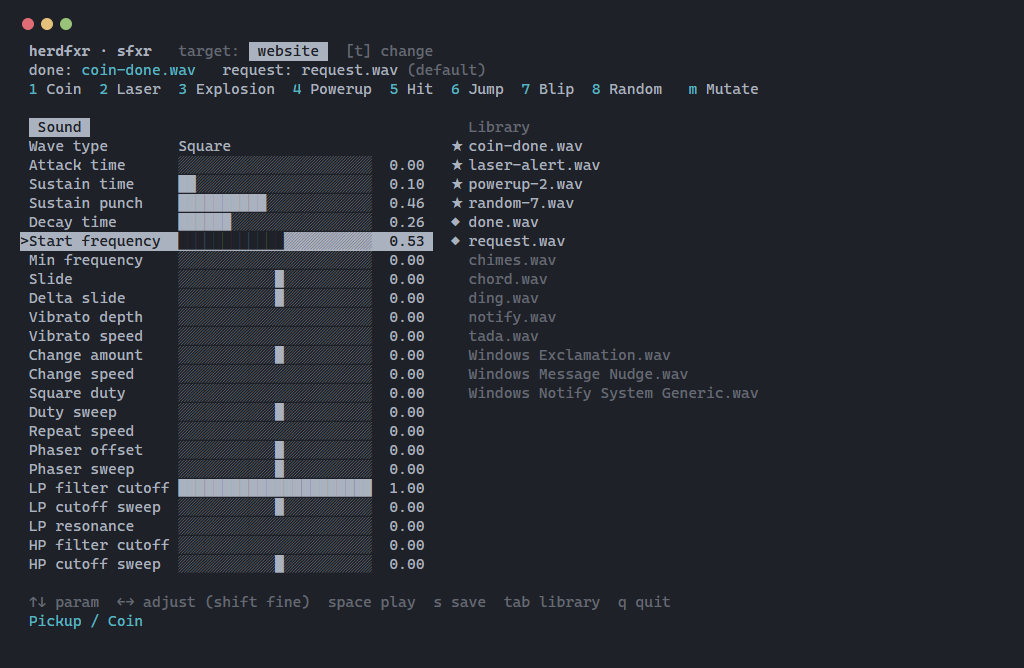
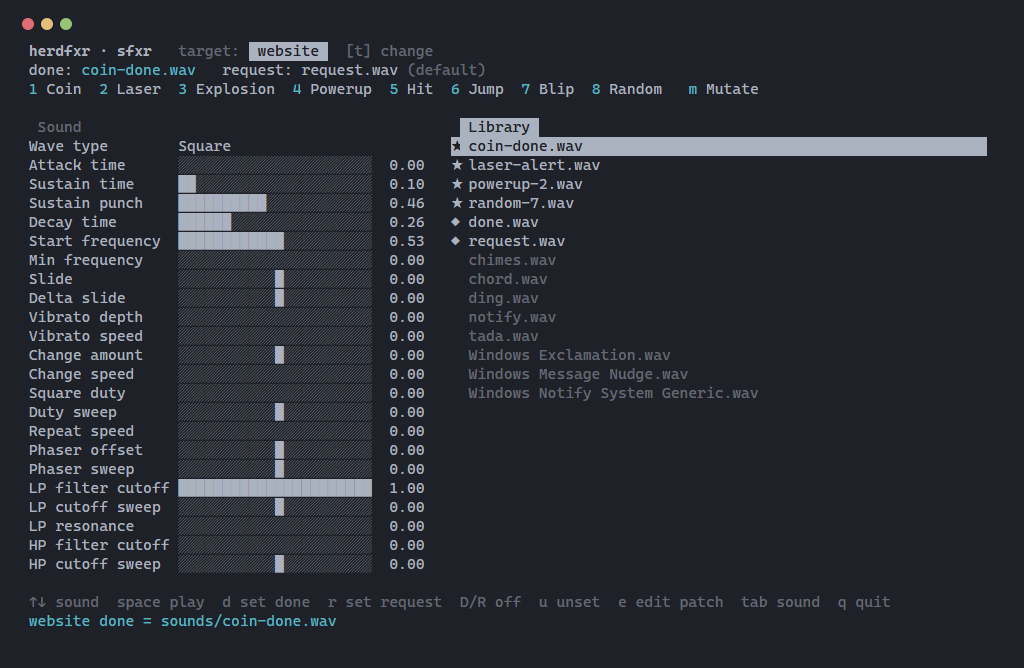
The designer is a Node TUI with no dependencies, opened as a herdr popup. Number keys run the generators, m mutates, and the arrow keys move through and adjust all 23 parameters, replaying as you go. s saves a wav plus a .sfxr.json patch so you can reopen it later. Then tab over to the library and press d or r to make the selected sound the done or request sound for the current space.
For previews, the TUI starts one resident PowerShell process and sends it a line per sound over stdin:
play 0.8 preview-2.wav
pwsh starts once per session instead of once per keypress. Previews also rotate between four temp files, because MediaPlayer holds the last one open.
The plugin ships two sounds of its own, made from fixed seeds: a coin for done, a double blip for needs-input. The first draft defaulted to Windows system sounds. That would have broken on every Mac.
Screenshots without my space names
A real screenshot of herdr shows my sidebar, client names and all. So the designer has a --snapshot flag that draws one frame of fake data, fake spaces like website and api-server, and exits. A small HTML page feeds that frame to xterm.js, and Playwright screenshots it.
That paid off right away. The first render cut off the title line, because the generator row was 118 columns wide and wrapped. It would have done the same in any narrow terminal. The labels are shorter now.
What I'd do differently
I tested on one machine. Windows 11, herdr 0.9.4 preview, Node 26. The macOS and Linux players (afplay, paplay, ffplay) are written but have never run.
Most of my testing used faked agents. report-agent is great for that, but a real Claude Code session might report states in an order I haven't seen.
One test bit me. herdr plugin pane open takes --env, so I pointed the config dir at a scratch folder. It doesn't override herdr's own plugin variables, so my "test" wrote to my real config and gave one of my spaces a test sound. Easy to undo, and now it's in the README.
Repo / links: https://github.com/joehahndev/herdfxr · install with herdr plugin install joehahndev/herdfxr/herdfxr · herdr: https://herdr.dev · sfxr: https://www.drpetter.se/project_sfxr.html