I got an F in handwriting in second grade. Part of that was the tri-colored-lead pencil (a C was the honest grade), but the trajectory held. Decades later my handwriting is still bad enough that my own grocery lists fight me in the store.
So I've kept trying to buy my way out. At one point I worked out a system for printing onto Post-it notes stuck to 3x5 cards, which worked right up until it jammed, every time, which is to say it didn't work. Then Walmart started selling the Core Innovations CTP500, a pocket thermal printer, and I bought one. Last year I tried to hack it into something useful and lost; either the drivers won or I quit too early. It went in a drawer.

The Post-it era, December 2020.
This weekend it came out of the drawer. It now prints grocery lists, recipes, and notes my wife and I leave each other, from a web page on our phones or from Claude in any terminal on the network. Getting there meant discovering the printer isn't what it claims to be, then working around a BlueZ limitation that kept it unreachable.
The plan that should have worked
Mel at ThirtyThreeDown already reverse-engineered the CTP-500.
Her Python app connects over Bluetooth Classic (RFCOMM, channel 1) and sends
ESC/POS-style raster data: render text to a 384-dot-wide 1-bit image, invert it, and
wrap it in GS v 0. The whole protocol fits in one readable file.
I built on that. A Python service with a Pillow layout engine and six templates
(checklist, shopping list, note, recipe, plain text, test page), a FastAPI web UI with
live preview, and an MCP server so Claude can print. One process serves all of it: the
MCP SDK's streamable-HTTP app mounts into FastAPI at /mcp, and the web UI gets the
rest. It runs on the little Linux box in my homelab, reachable over Tailscale,
registered once with claude mcp add --transport http, so no code lives on any client
machine.
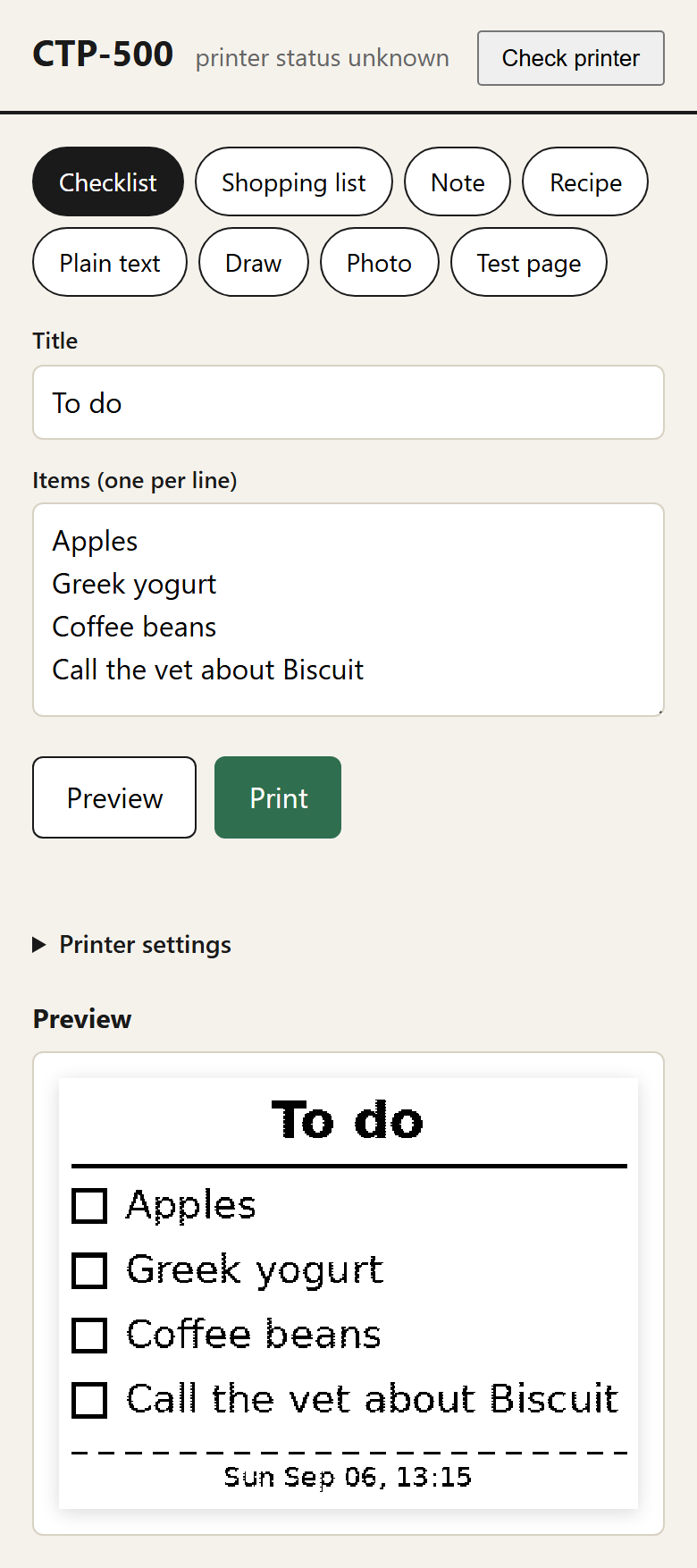
The web UI on a phone. Pick a template, fill it in, preview exactly what the paper will look like, print.
Two mcp-SDK-2.x notes, since the 1.x examples are everywhere and wrong now: FastMCP
is renamed MCPServer, and the transport's DNS-rebinding protection rejects any
non-localhost Host header with a 421 until you pass TransportSecuritySettings with
your real hostnames.
The dry run validated byte-for-byte against the reference app: 26,658 bytes for the test page, correct header, 48 bytes per row. Then I sent it to the actual printer and nothing happened. The connection was accepted, the bytes went out, and the paper never moved.
The printer is not a CTP-500
The status query that should return 38 bytes returned silence. The self-test page still
printed fine from the power button, so the mechanism worked. The RFCOMM service answered
connect() and then discarded everything sent to it, which is a rude way for a serial
port to behave.
The tell was in the GATT table. A BLE probe showed service 0xAF30 with characteristics
AE01 (write) and AE02 (notify). That isn't the CTP-500 protocol Mel documented; it
belongs to the cat printer, the GB01/GB02 family
of Chinese mini printers that hobbyists fully reverse-engineered years ago. Those speak
a framed command protocol (0x51 0x78, a command byte, a length, a payload, a CRC8,
0xFF) with no ESC/POS anywhere in it. My unit even advertises itself as "Mini
Printer-0103". It has the same shell as the printer Mel had and different guts, and the
RFCOMM service is apparently a vestigial stub.
So the fix was swapping the entire wire protocol while keeping everything above it. The renderer didn't change. Rows go out as run-length-encoded frames when they compress, and as raw 48-byte bitmaps when they don't.
BlueZ picks the wrong transport, permanently
One problem left. The printer is dual-mode: it advertises Bluetooth Classic and BLE from
the same address, and its LE advertisement sets the "BR/EDR supported" flag. BlueZ 5.72
sees that flag, types the device as classic, and from then on every Connect(),
including bleak's, takes the classic transport, the same one that swallows bytes. The
error it reports, br-connection-profile-unavailable, gives no hint that transport
selection is the problem. BlueZ 5.79 added a per-device preferred-bearer; Mint ships
5.72.
gatttool connected fine, though. It doesn't ask bluetoothd for anything; it opens a
raw L2CAP socket on the ATT channel with an LE address type and the kernel just does it.
Python can do the same in about 120 lines: socket(AF_BLUETOOTH, SOCK_SEQPACKET, BTPROTO_L2CAP), a sockaddr_l2 with cid=4 and BDADDR_LE_PUBLIC built via ctypes
(the stdlib doesn't expose those two fields), then just enough ATT to be useful: MTU
exchange, one CCCD write, and write-without-response for the data.
One detail worth keeping: during the MTU exchange the printer sends its own MTU request while your request is in flight. If your client expects a tidy request-response pair, it deadlocks. Answer the peer's request, then keep waiting for the response to yours. Negotiated MTU came out to 247, and at 244 data bytes per write a full page moves in under two seconds.
The first thing it printed was a box with "BLE works!" in it.
What it does now
The web UI grew past lists. There's a draw tab (pointer events, so finger, stylus and mouse all work) with a pen, an eraser, undo, and a text stamp for people who'd rather not inflict their handwriting on a canvas either. There's a photo tab with three dither modes: Floyd–Steinberg for photos, ordered Bayer for a halftone look, and plain threshold for line art. Photos downscale in the browser before upload.
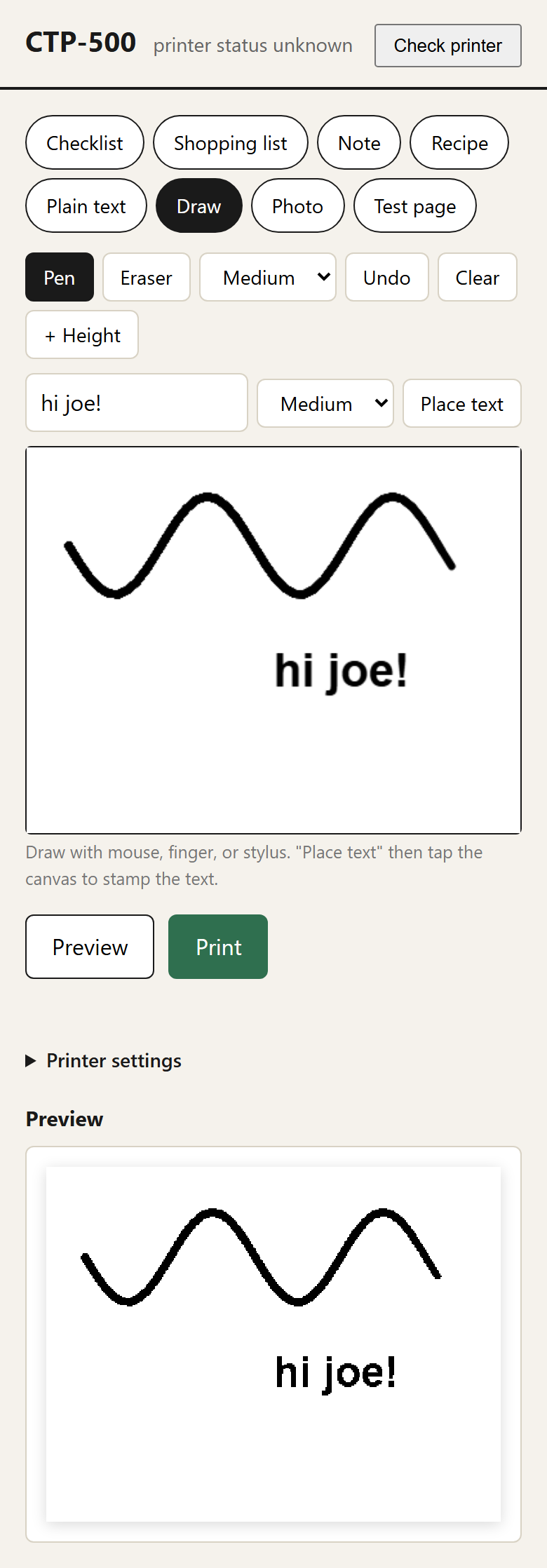
The draw tab, mid-doodle.
And Claude prints. print_checklist, print_shopping_list, print_note,
print_recipe, and print_text are typed MCP tools, available from any session on the
tailnet. "Print a shopping list for chili" now ends with paper coming out of a drawer in
another room. The kid-grade handwriting problem is solved by the same move I've been
making since second grade: don't write it, print it.
What I'd do differently
- The "printer ready" notification from the catprinter protocol never fires on this firmware, so job completion is a grace period, not an ack. Untested on any other unit.
- The raw-ATT client hardcodes GATT handles (
0x0006,0x0009) discovered on this one printer. Fine for n=1, but a second unit should get a discovery pass instead. - BlueZ 5.79+ would make the whole ctypes layer unnecessary. Upgrading BlueZ on a box that hosts other services felt riskier than 120 lines of ATT, but I didn't test that belief.
- I never found out why the RFCOMM stub accepts connections. A firmware someone shipped and forgot, probably. If your CTP500 actually prints over RFCOMM, you have the printer Mel had, and none of the BLE work applies.
Repo / links: thirtythreedown/CTP500PrinterApp · rbaron/catprinter · parkerlreed's CTP500 gist